Quran app for kids

Quran app for kids

Listen to, learn and follow the Quran word by word, in an experience made for children.

Free to download. Listening, reading and word-by-word in the same module.

بِسْمِاللَّهِالرَّحْمَٰنِالرَّحِيمِ

In the name

Each word, as it is recited

Two uses

Listen to recite, learn to progress

Muslim Guard’s Quran module does two concrete things. You can simply listen, or move into word-by-word learning.

Listen

Listen to the recitation

Play a surah’s recitation, pick a reciter, set the repetition and follow the text, simply.

Learn

Learn word by word

Each word lights up as it is recited. The child sees, hears and repeats — this is what sets it apart from a plain audio player.

The heart of the learning

Word by word, synced with the recitation

This is the feature that changes everything: instead of a block of text, each word lights up the moment it is spoken.

Real preview of the word-by-word learning mode

  1. 01

    Follow each word

    The word being recited is highlighted. The child always knows where they are.

  2. 02

    Repeat the passage

    Choose how many times a verse repeats: 1, 2, 3, 5 times or on a loop, to anchor memorisation.

  3. 03

    Change the reciter

    Several voices available, including a recitation made for children, to find the right pace.

  4. 04

    Understand the meaning

    The French translation and tafsir appear when needed, under the verse, without leaving the reading.

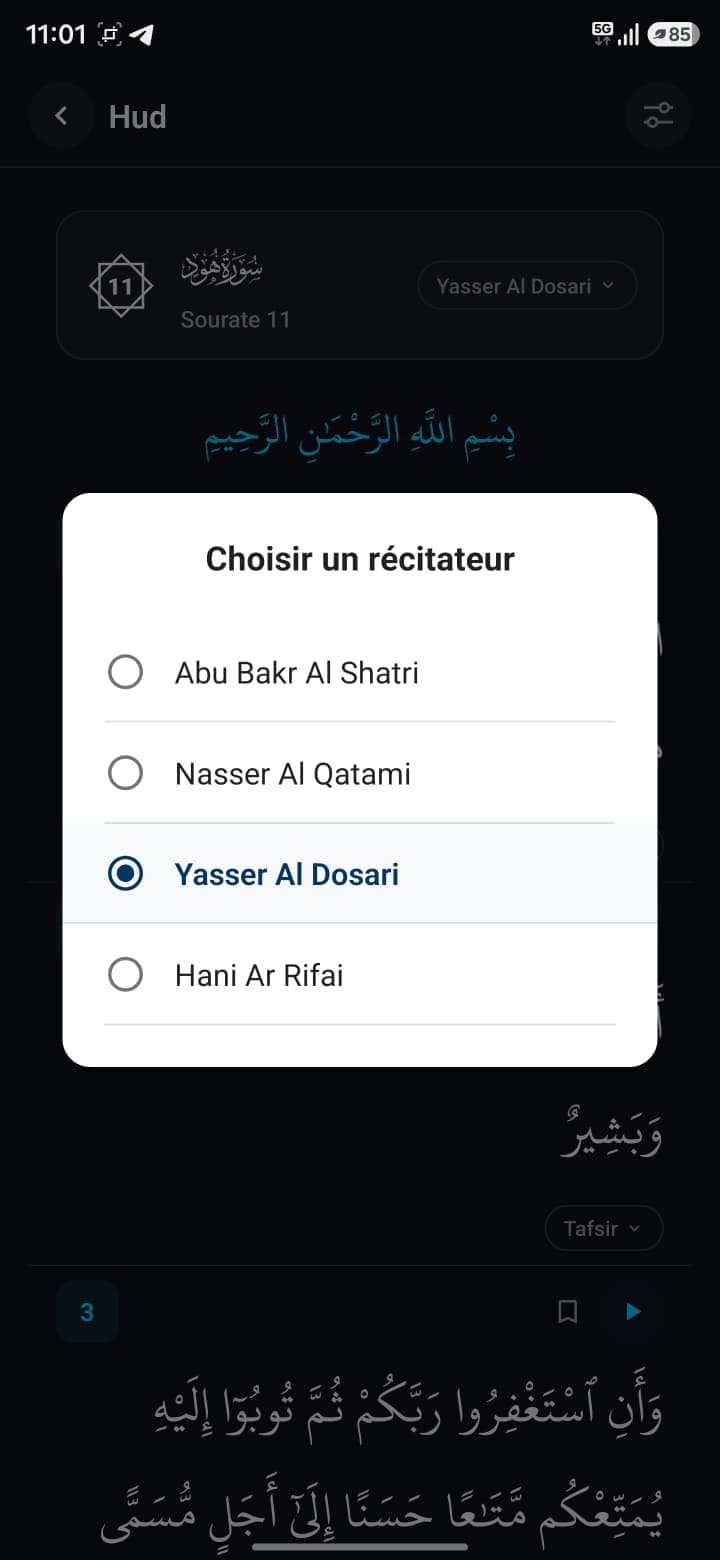
Reciter picker in the Muslim Guard Quran module

Reciters

Choose the recitation that suits them

Listening isn’t fixed: change voice with one tap, including a recitation made for children.

  • Abu Bakr Al Shatri
  • Nasser Al Qatami
  • Yasser Al Dosari
  • Hani Ar Rifai
  • Minshawi KidsKids voice

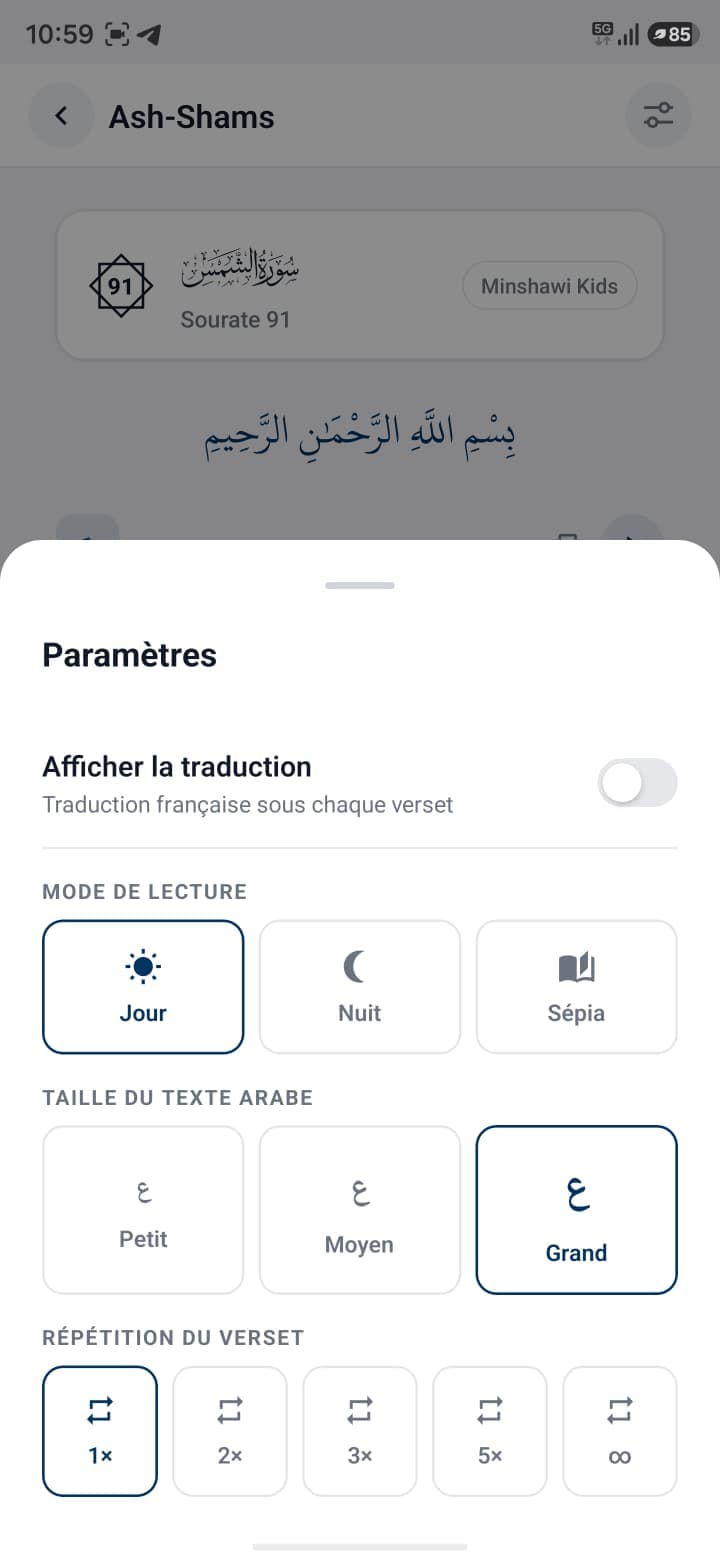
Repetition

Repeat to memorise better

Set how many times a verse repeats, to suit the moment.

Verse repetition

1× · 2× · 3× · 5× · Loop

Quran reading settings: mode, text size and repetition

Understand

Read, understand and go deeper

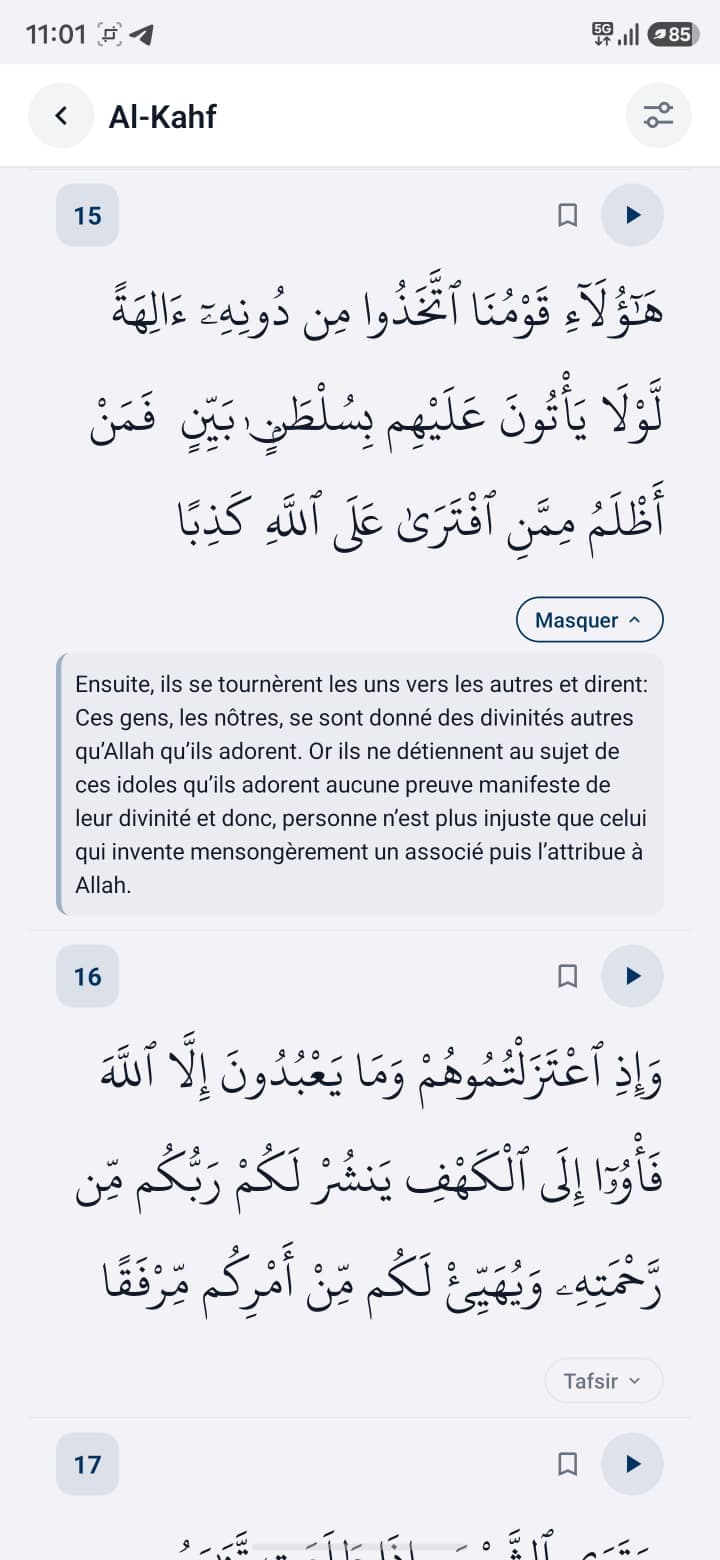
Under each verse, the French translation helps understanding, and the tafsir lets you go further when you want.

Tafsir shown under a verse in Muslim Guard

French translation

The translation shows under each verse, toggled from a setting.

Tafsir

The tafsir unfolds verse by verse, to go deeper without leaving the page.

Reading comfort

Reading that adapts to each child

The display adjusts: reading mode and Arabic text size, for comfort depending on the moment and the child.

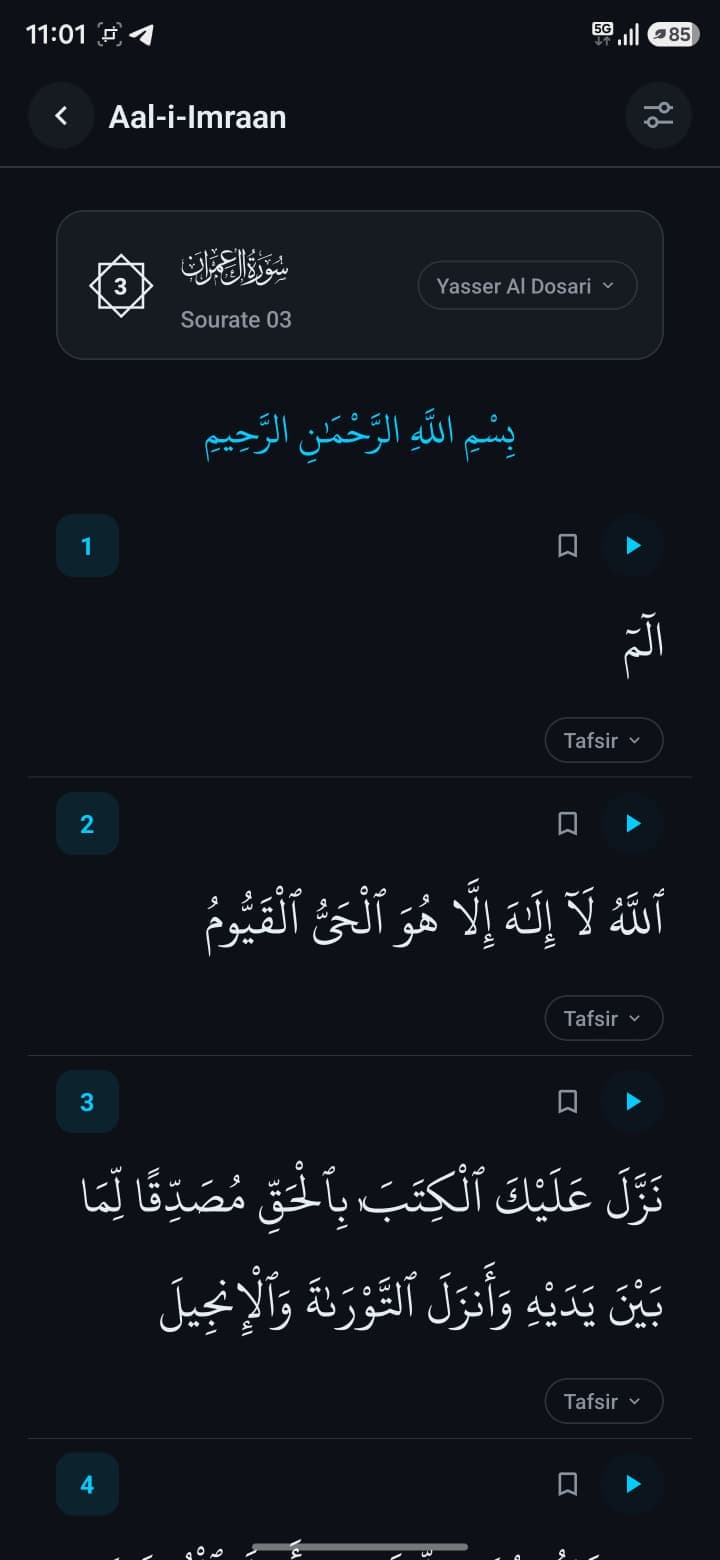
Day

Day · Night · Sepia

Arabic text size

ٱلْحَمْدُ لِلَّهِ رَبِّ ٱلْعَٰلَمِينَ

Every day

Easily find what you read often

The module is more than a player: find a passage again, keep your markers and pick up where you left off.

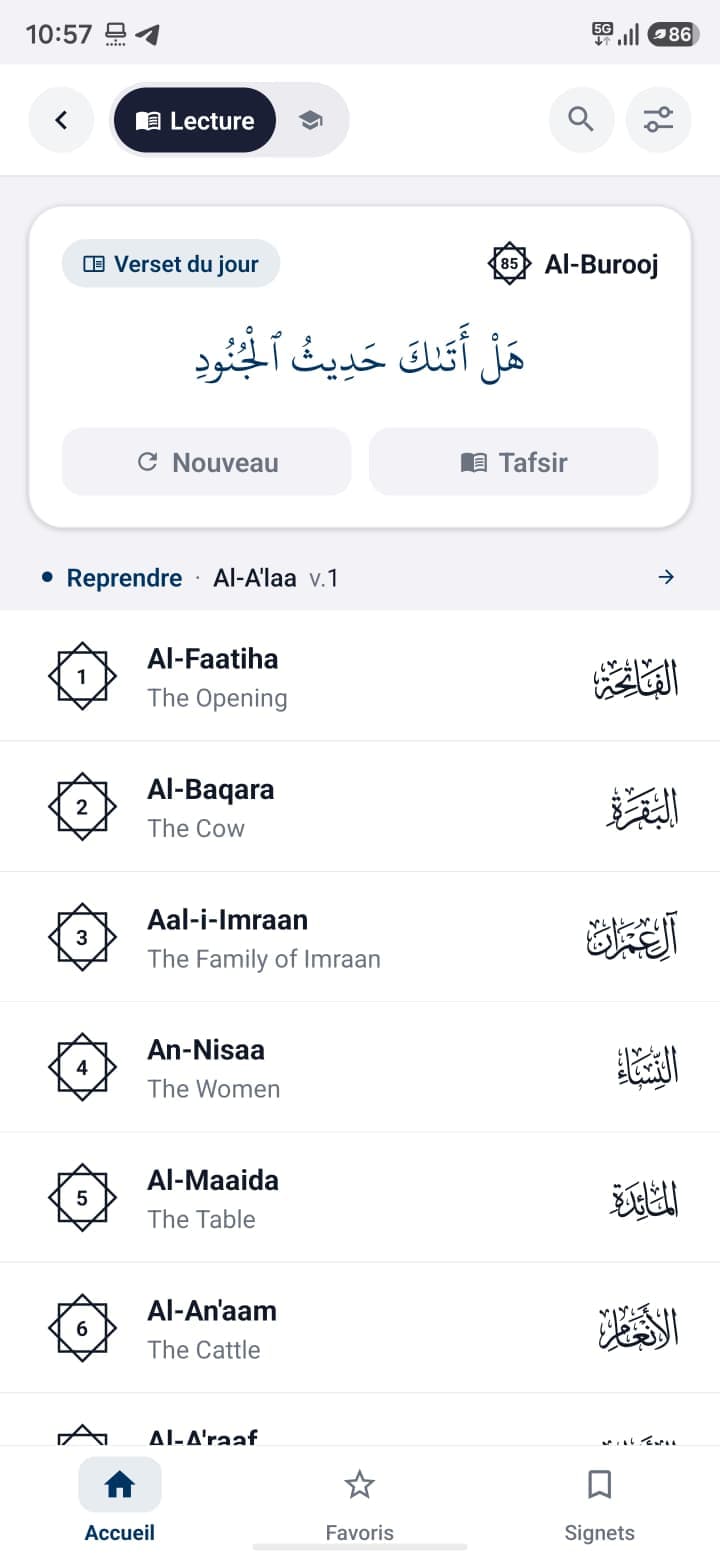
  • Search

    Find a surah quickly.

  • Favourites

    Keep the surahs you listen to most.

  • Bookmarks

    Come back to a specific verse later.

  • Verse of the day

    A verse featured each day, with its tafsir.

Quran home screen in Muslim Guard: surah list and verse of the day

In the app

Find the Quran inside Muslim Guard

The Quran module is part of Muslim Guard, a broader app for children: stories, Arabic, invocations and games in one place.

  • Listen to and read the Quran
  • Synced word-by-word learning
  • Repetition, reciters, translation and tafsir
  • Adjustable reading modes and text size

Free

Start without paying

The download and exploring the Quran module are free.

Ultra

Go further

Ultra unlocks all Muslim Guard content and activities.

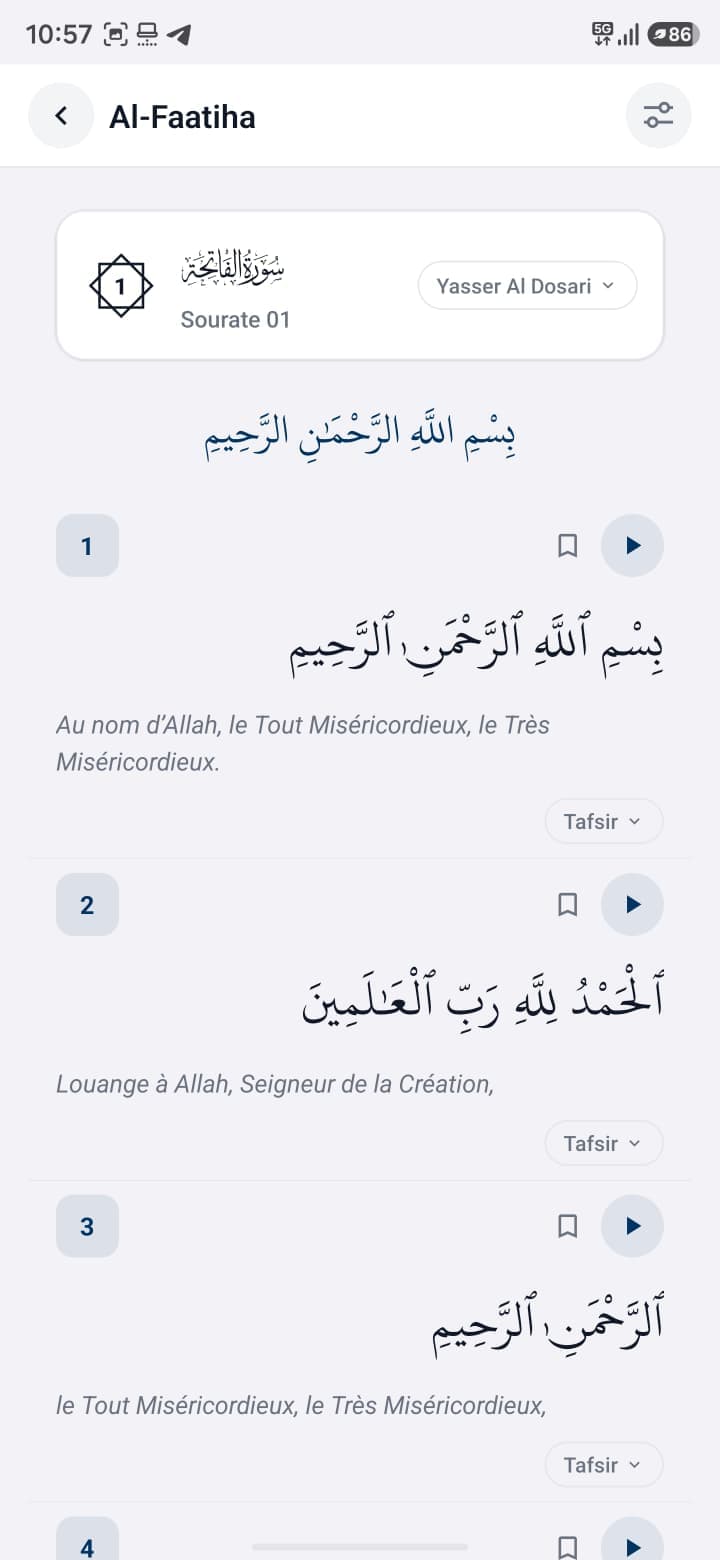
Open surah with recitation and translation in Muslim Guard
Quran home screen in Muslim Guard: surah list and verse of the day
Reading the Quran in night mode in Muslim Guard

Download

Install Muslim Guard and open the Quran

Free to download. Play a surah, follow word by word, set the repetition.

Download for free

Available on Android. On iPhone, the button shows availability in real time or offers the waitlist.

Which Quran app should you choose for a child?

A good kids Quran app lets you listen to the recitation, but also learn: follow the text, repeat a passage and understand the meaning. Reading clarity and simplicity matter as much as content.

Muslim Guard brings these together: listening with several reciters, synced word-by-word learning, adjustable repetition, French translation and tafsir, plus display settings for reading comfort.

What to look at before choosing

  • The ability to listen to the recitation
  • A real learning mode, not just audio
  • Word-by-word tracking
  • Repeating a passage
  • Translation and tafsir
  • Reading comfort: mode and text size

How do you learn the Quran with an app?

The approach is simple and gradual: listen to the recitation, follow the text word by word, repeat the passage several times, then use the translation and tafsir to understand.

The key is regularity: return often to the same verses, adjust the repetition and reciter, and let the child move at their own pace.

Listen or learn: why choose?

The two uses complement each other. You can listen to a surah to get familiar with the recitation, then switch to learning mode to follow each word and repeat.

In Muslim Guard, you move from one to the other without changing tools: the same surah can be listened to, followed word by word, and read with translation or tafsir.

Frequently asked

Your questions about the Quran

01Which Quran app should you choose for a child?+

Muslim Guard offers a kids Quran module to listen to the recitation and learn word by word, with repetition, several reciters, French translation and tafsir.

02Can Muslim Guard play the Quran?+

Yes. You play a surah’s recitation, verse by verse, and can follow the text while listening.

03Can you learn the Quran word by word?+

Yes. Learning mode highlights each word as it is recited, to follow and memorise more easily.

04Can you choose several reciters?+

Yes. Several voices are available, including a recitation made for children; you change reciter with one tap.

05Can you set the number of repetitions?+

Yes. Choose how many times a verse repeats: 1, 2, 3, 5 times or on a loop.

06Can you show the French translation?+

Yes. A setting shows the French translation under each verse.

07Can you show the tafsir?+

Yes. The tafsir unfolds verse by verse to go deeper into the meaning.

08Can you adjust the display (night mode, text size)?+

Yes. You choose the reading mode (day, night, sepia) and the Arabic text size (small, medium, large).

09Can you search a surah and save favourites?+

Yes. Search helps you find a surah, and you can keep favourites and bookmarks to pick up later.

10Is there a free version?+

The download and exploring the Quran module are free. Ultra unlocks all Muslim Guard content and activities.

Start today

Listen, follow, repeat — in one app

Install Muslim Guard, open a surah and let your child follow the Quran word by word.

Download Muslim Guard